
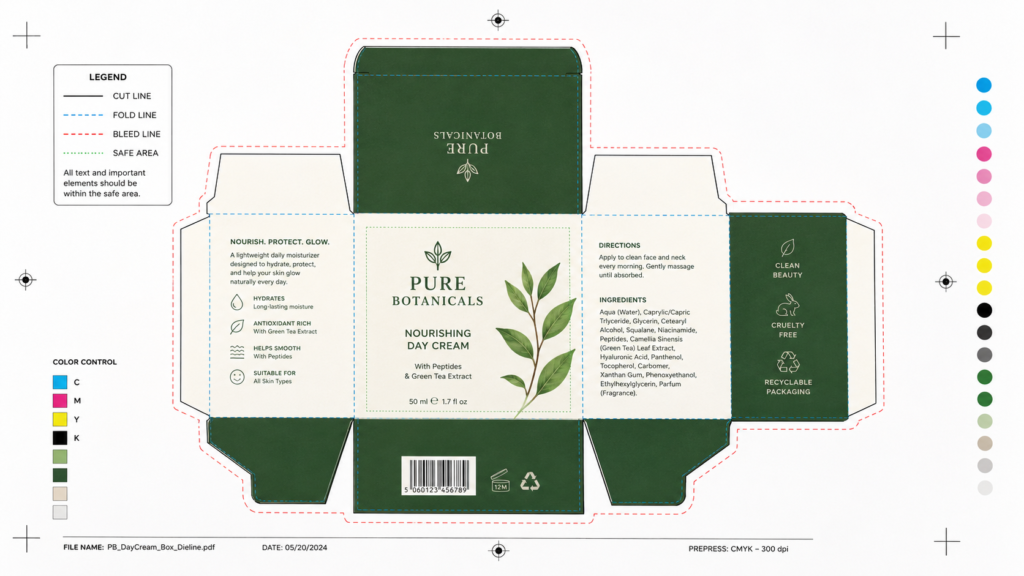
If you’ve ever looked at the edge or back of a cereal box, a candy wrapper, or any commercially printed package, you may have noticed a row of small colored dots or squares — sometimes along the edge, sometimes in a corner. They look almost decorative, but they serve a very specific technical purpose.
These dots are called printer’s color blocks, color calibration marks, or process color patches — and they’re an essential quality control tool in commercial packaging printing. Here’s exactly what they mean and why they matter.
What Are the Colored Dots on Packaging?
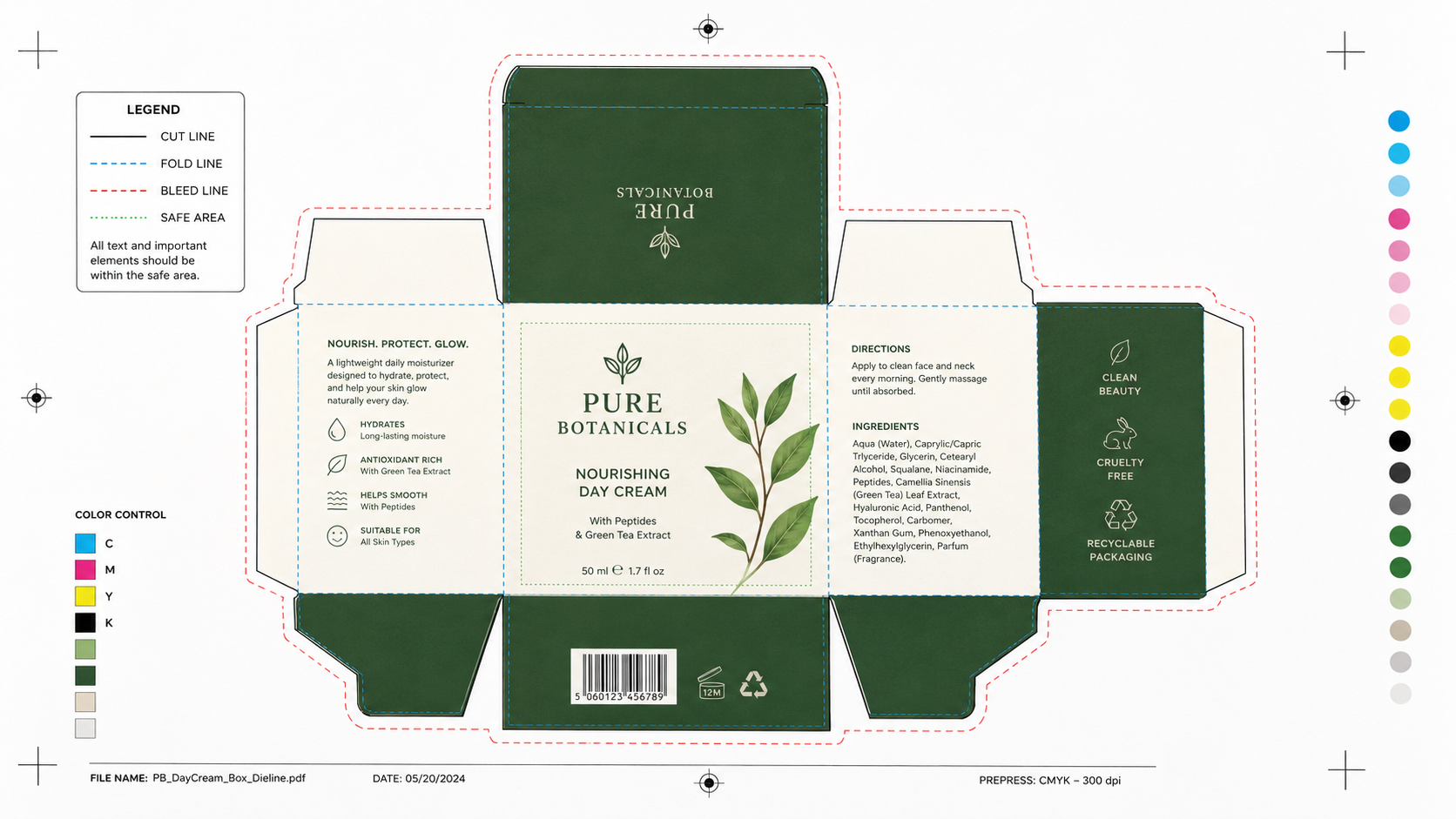
The colored dots (or squares) you see on packaging are printed color reference patches — small blocks of each ink color used in printing that job. They’re printed outside the final cut line of the packaging (in what’s called the “bleed” or “waste” area) and are trimmed off in most finished consumer packaging.
When they’re visible on packaging in stores, it usually means either:
- The packaging was not trimmed to its full bleed area (common in flexible packaging or bags)
- They were intentionally left visible as part of the design or printing process
- The package is printed as a continuous web (film or flexible material) where trimming off bleed areas isn’t practical
The Four Basic Colors: CMYK
Most commercial packaging printing uses the CMYK color model — four process inks that combine to reproduce virtually any color:
- C — Cyan (a blue-green ink)
- M — Magenta (a pink-red ink)
- Y — Yellow
- K — Black (also called “Key”)
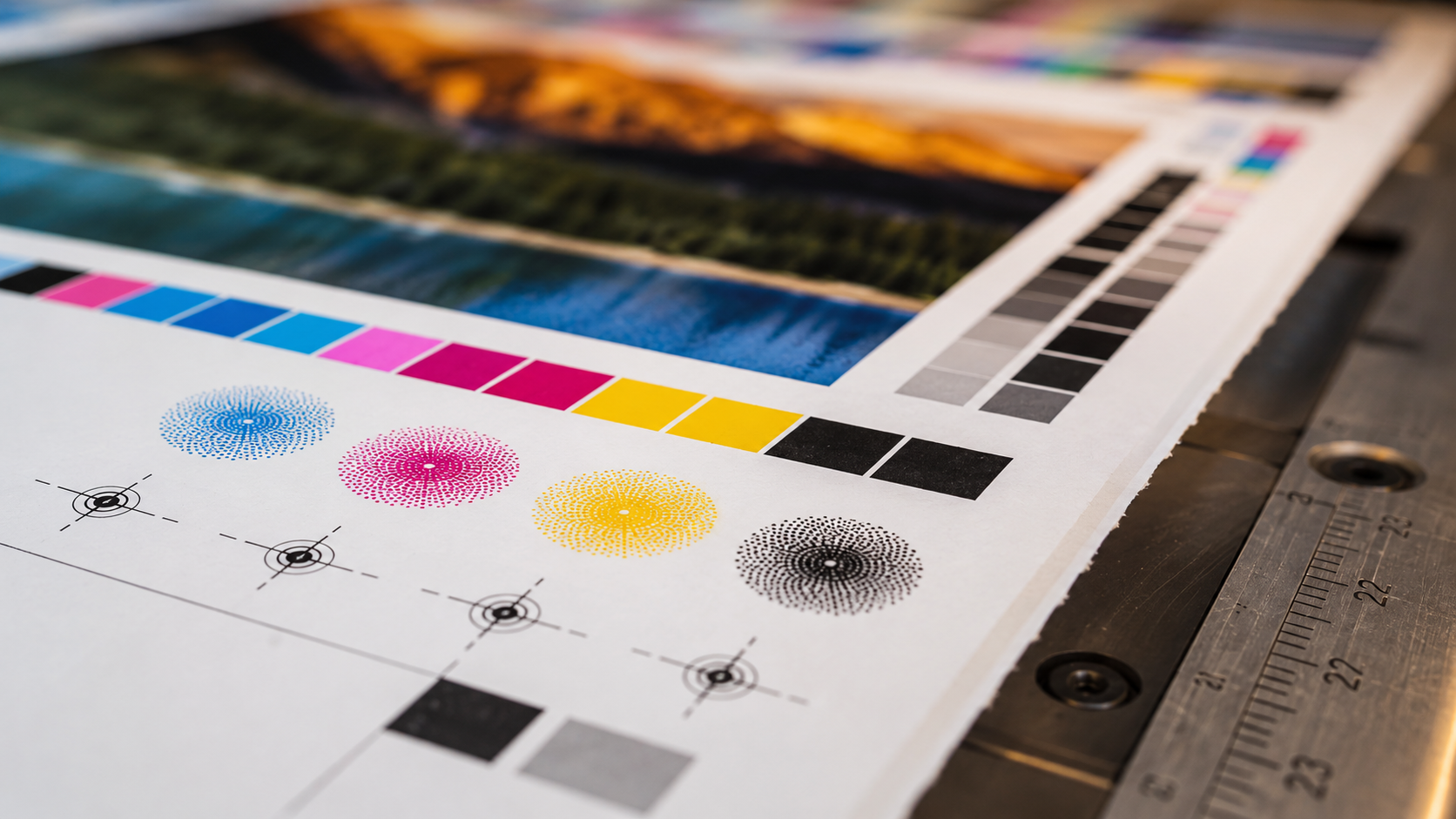
The colored dots on packaging typically include at minimum these four CMYK patches. By visually checking these patches against a known standard, press operators can verify that each ink is printing at the correct density and hue.
What Each Set of Dots Tells the Printer
| What They Check | How It’s Done |
|---|---|
| Ink density (how dark/light) | Compared to standard density targets using a densitometer |
| Color accuracy | Measured with a spectrophotometer against color profiles |
| Dot gain (ink spread) | Observed in the tonal patches (light vs. dark versions of each color) |
| Trapping (color overlap) | Overprint patches show how colors blend where they overlap |
| Registration (alignment) | Registration marks alongside the color blocks confirm all plates are aligned |
Additional Colors Beyond CMYK
Many packaging jobs use additional inks beyond the standard four. If a brand has a specific Pantone® color (like a proprietary red or a gold metallic), that ink will have its own color block in the set. You might see 5, 6, or even 8+ colored dots on complex packaging that uses:
- Pantone spot colors for brand consistency
- Metallic inks (gold, silver, copper)
- Fluorescent inks (for vivid, bright colors)
- White ink (used on transparent or dark substrates)
- Varnish or coating layers
Are They Only on Packaging?
No — color patches appear on virtually all professionally printed materials, including magazines, books, labels, and commercial print jobs. They’re always printed in the trim or bleed area. You most commonly see them on packaging because:
- Flexible packaging (bags, pouches, wrappers) often has visible edge areas where the patches remain
- Packaging is often inspected before trimming in the quality control process
- Some budget packaging doesn’t trim the full bleed, leaving color patches exposed
Other Marks You Might See Alongside the Dots
Color patches usually appear alongside other print quality control marks:
- Registration marks — Crosshair or bullseye symbols that confirm all printing plates are aligned
- Crop/cut marks — Short lines indicating where the final cut should be made
- Barcode test patches — Small barcodes used to verify print quality for machine-readable codes
- Fold/score lines — Dotted lines indicating where the packaging should be folded

Why Do These Dots Matter for Brand Owners?
Understanding color patches matters if you’re commissioning custom packaging. Here’s why:
- Color consistency — Color patches help ensure your brand colors are reproduced accurately every time, across different print runs and different print facilities
- Quality verification — When reviewing printed samples, you can check the color patches against your approved color standards to verify accuracy
- Press approval process — During a press check, you and the printer will review the color patches together to confirm the print is approved before the full run begins
Key Takeaways
- Colored dots on packaging are printer’s color blocks used for quality control
- They show each ink used in the print job (at minimum: cyan, magenta, yellow, black)
- They’re normally trimmed off but may remain visible on flexible or budget packaging
- More dots = more inks used in the job (Pantone, metallic, fluorescent, etc.)
- They’re a standard part of professional printing worldwide — not errors or defects
Final Thoughts
Those small colored dots are a window into the technical precision behind every professionally printed package. They’re part of a quality system that ensures the colors you see on your products are exactly what was specified — every time.
At PackPro, we take color accuracy seriously. Our printing process includes rigorous color management at every stage to ensure your brand colors are reproduced consistently and correctly. Talk to our team about your custom packaging needs today.
Related Reading
- How Packaging Colors Influence Customer Decisions
- Matte vs Gloss Finish Boxes: Benefits and Differences
- What Does Collate Mean in Printing?
Frequently Asked Questions
Are the colored dots on packaging a printing error?
No — colored dots on packaging are intentional quality control marks, not printing errors or defects. They are called printer’s color blocks or process color patches, and they are a standard part of professional commercial printing worldwide. Their presence simply means the package was printed using multiple ink colors that needed to be monitored during the press run.
Why do some packages have more colored dots than others?
The number of colored dots directly corresponds to the number of inks used in that print job. A standard four-color CMYK job will have four dots (cyan, magenta, yellow, and black), while a more complex job using Pantone spot colors, metallic inks, or fluorescent inks will have additional dots for each extra ink. Premium packaging with six or more colors is common in luxury branding.
Why are the colored dots visible on some packaging but not others?
Color patches are always printed in the bleed or waste area of the sheet and are normally trimmed off during the finishing process. They remain visible on flexible packaging such as bags and pouches where trimming the full bleed area isn’t practical, on budget packaging where full trimming isn’t performed, and occasionally on packaging inspected before the final trim stage.
How do printers use the colored dots to check print quality?
Press operators measure the color patches using instruments called densitometers and spectrophotometers, which read the ink density and color values of each patch. These measurements are compared against approved color standards — if any ink is too light, too dark, or off-hue, the press operator adjusts the ink feed before continuing the run, ensuring consistent color throughout the entire job.
Should brand owners care about color patches when ordering custom packaging?
Yes — understanding color patches helps brand owners participate more effectively in the press approval process. During a press check, reviewing the color patches alongside your approved Pantone or CMYK color standards lets you verify that your brand colors are being reproduced correctly before the full production run begins. This is especially important for brands with tightly controlled color identities.